What it does
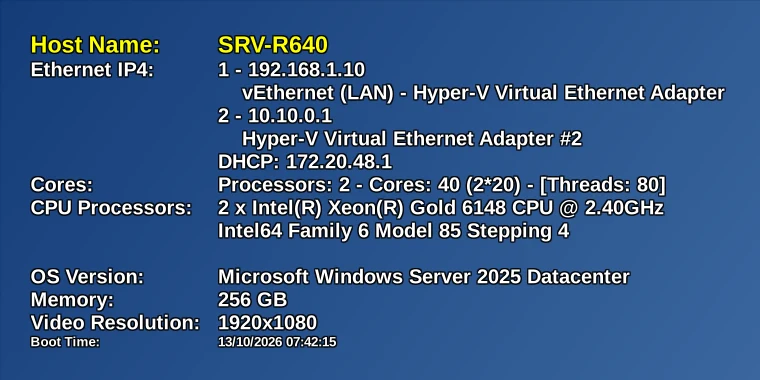
It replaces BGInfo and its VBScript scripts with a single executable: the information is read from WMI, the Windows APIs and the registry, and the image is drawn and set as the background without external programs. The background chosen by the user remains the base and can be restored at any time.
It is configured from a window with a live preview, and the configuration is a readable XML file. In resident mode it stays in the notification area and updates the background when the network, resolution or monitors change, when the session is unlocked and when an RDP session reconnects.
- One image per monitorAt the exact resolution, with text and margins scaled to the DPI.
- Ready-made fieldsName, domain, user, IPv4 and IPv6, gateway, DNS, CPU, memory, volumes, BIOS, Service Tag, uptime and more.
- Custom fields without scriptsWMI queries, registry values, environment variables.
- Always readableText shadow or outline, semi-transparent panel with rounded corners.
- Multi-user serversEach user has their own images; automatic startup can apply to all users.
- Command line
/apply,/monitor,/restoreand/exportfor scheduled tasks and documentation.
Requirements
| Operating system | Windows 10, Windows 11, Windows Server 2016 or later, with Desktop Experience |
|---|---|
| Framework | .NET Framework 4.8 (already included in Windows 10 from version 1903, in Windows 11 and in Windows Server 2022 and 2025) |
| Permissions | Standard user; administrator only to enable automatic startup for all users |
| Installation | None: a single executable with the .xml configuration files |
Installation
- Create a folder, for example
C:\Program Files\InfoDesktop, and copy InfoDesktop.exe, InfoDesktop.exe.config and the .xml files into it. - Start InfoDesktop.exe: the configuration window opens with the preview.
- Click Applica allo sfondo (Apply to background).
- In the Avvio (Startup) tab choose whether to start it at sign-in, for the current user or for all users.
All the details are in the manual, which you can download alongside.
Good to know
- If the current background is still the image created by BGInfo, InfoDesktop uses the default Windows background. Remove the old BGInfo startup entries first.
- Listing Hyper-V virtual machines requires a user in the Administrators or Hyper-V Administrators group.